Contact information - Contact Card
The Contact Card is displayed on the page Contact & help.
All contact data is managed in one place:
For page-designers
The Structure/template used is named 'Contact Card'
The article that uses this template is already created, and is explained in the next paragraph.
For content-editors
The article where all contact data for the Contact Card can be managed can be found under articles:
> Content > Contact Data > Contact Card details
Common fields
Some fields are the same for each brand, so need only to be managed once. These fields are:
- Card Title
- Card Subtitle
- Contactblock Title: In this field you can use the {{brandname}} variable to show the correct brand for each hostname.
Brand specific fields
Next are fields that have specific content for each brand.
Although these blocks are repeatable (meaning you can add or delete blocks), you don't need to do so, as the necessary blocks are already made available by a page-designer or administrator for each brand.
Each new block starts with a title CONTACT INFO, within these blocks you will find the following fields:
- Brand: select box with all available brands, DON'T CHANGE this field, as it needed for correct mapping of data <> brand.
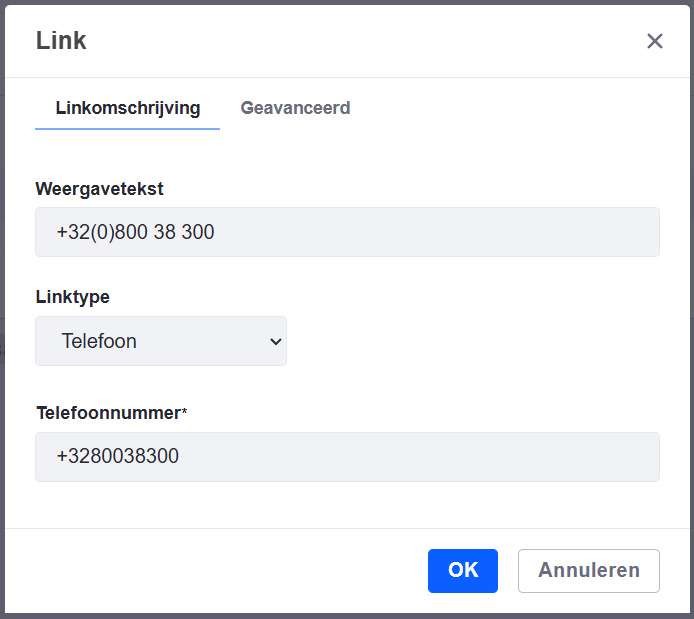
- Phone: The phonenumber can be editeded by selecting the phonenumber and next clicking on the link icon in the toolbar:
From top to bottom you see:
- The number that will be displayed (in this example: +32(0)800 38 300)
- Linktype: Phone
- The number that's behind the link and will be used to make an actual call when clicking the link (in this example: +3280038300)
- Office Hours Line 1: for general opening hours (e.g. from monday to friday)
- Office Hours Line 2: for exceptions (e.g. on saturday)
When all necessary changes are done, just click Publish in the top-right corner.
If you want more information on content-editing, please read the article How to edit content